Wall paper
Disable the USB
Configure FTP Sites in IIS 6.0
Webcam on your laptop
Install Imported Certificates
right mouse button
boot Windows XP from a USB
Add your email to Outlook
right mouse button
boot Windows XP from a USB
Parent Control
Hidden Administrator Accoun
Parent Control
Your IP
Your network IP's
1
|
2
|
3
|
4
|
5
|
6
|
7
|
8
|
9
|
10
|
11
|
12
13
|
14
|
15
|
16
|
17
|
18 |
19
|
20 |
21
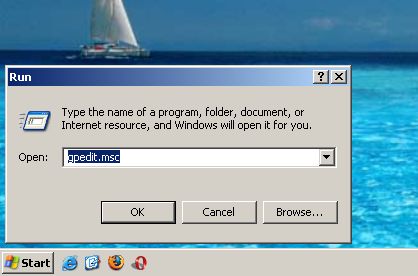
To pervent user from changing your wall paper
1.Click Start > Run > type GPEDIT.MSC and press Enter.
2. Expand to User Configuration - Administrative Templates - Control Panel - Display.
Contact
|
Empolyment
|
Flash Aplication
|
JAVA Application
|
Packages
|
log in
©2009 A WEB CREATER